-
IPTV Software Updates: Summer 2026
-
IPTV Box 1.21 Software Updates are done in one Market area at a time; please see the tentative schedule* below
- DC Metro Area: June 23 - 27, 2026
- Massachusetts: July 7 - 11, 2026
- New York: July 14 - 18, 2026
- Washington: July 21 - 25, 2026
- California: July 28 - Aug 1, 2026
- Oregon: July 28 - Aug 1, 2026
- Texas: Aug 4 - 8, 2026
- Pennsylvania: Aug 11 - 15, 2026
- Illinois: Aug 18 - 22, 2026
- Indiana: Aug 18 - 22, 2026
*schedule subject to change; please check back often for your area's upgrade schedule
Customers will receive these emails the day they are upgraded:
Multi-View on IPTV
-
This feature is available on IPTV boxes with the 1.21 Software Update
Click here for complete details on Multi-View
- Watch up tp 4 channels side-by-side
- To focus on one channel again, press OK to make it Full Screen
- Press Back to return to Multi-View at any time

-
Sports Menu Changes
-
This feature is available on IPTV boxes with the 1.21 Software Update
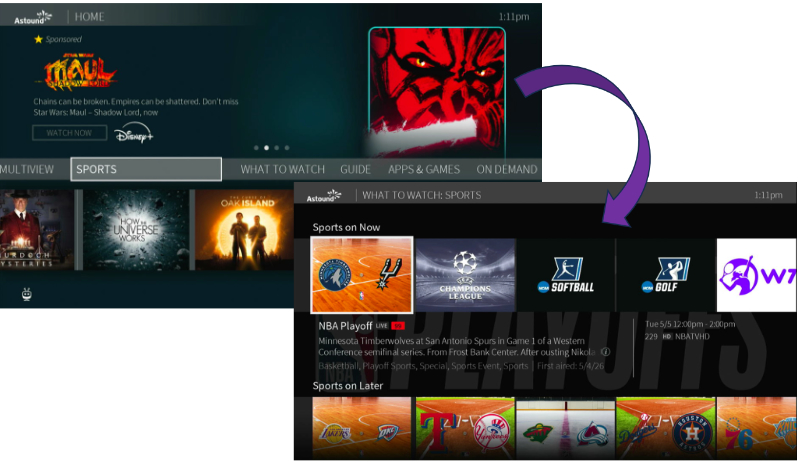
Sports Menu Change Overview
- New Home Screen menu shortcut
- Click Sports to jump to What to Watch with the Sports filter already applied
-
To Do List Updates
-
This feature is available on IPTV boxes with the 1.21 Software Update
Click here for complete details on the To Do List
- Look for a red dot on the Guide next to a show to indicate a recording
- See all upcoming recordings and conflicts at-a-glance

-
Home Screen Changes
-
This feature is available on IPTV boxes with the 1.21 Software Update
Home Screen Updates Overview
- Live Video was removed from the Home Page
- Rotate through popular options to watch
- Find something you like? Press down on the remote for quick access to the Menu

-
TrickPlay Updates for the SA6 Remote
-
This feature is available on IPTV boxes with the 1.21 Software Update
Click here for full details on the changes for TrickPlay
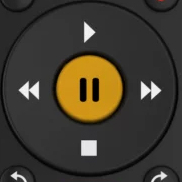
- TrickPlay controls are no longer on screen
- The Directional Pad (Up, Down, Left, Right Arrows) does not control TrickPlay
- For the SA6 remote, you must use Fast Forward, Rewind, Pause, Play and Stop buttons on the remote
|

