-

- With the Astound TV+ app, stream live TV where you want on your device
- Use the Astound TV+ app to search, schedule, record and watch on your Internet-connected device
- The Astound TV+ app is available to customers who have a cable subscription with IPTV equipment on their account. In order to use all features available, you must be using your local wireless network
- Use your MyAstound credentials to sign in on a device
- Please note: the Astound TV+ app is not allowed outside the continental United States
-
Restrictions/Limitations:
-
- Limit is 5/6 simultaneous streams (primary device + 5 devices)
- Can download/register up to 12 devices (auto age out in 6 months without use)
- Must have active cable service and at least one IPTV box with Astound
- With the app on a phone or tablet, you can watch out of the home. However, some programmers do not permit out of home streaming. We are currently aware of these stations that restrict out of home streaming of Live TV.
- Recordings cannot be downloaded to your device. Subscription On Demand and your own recordings (from the cloud/nDVR) can be watched out of the home
- Currently, On Demand cannot be purchased/watched out of the home unless you originally purchased in the home. If this is the case, you are able to resume it from your My Rentals folder. Additionally, if you are subscribed to these channels and VOD, out of home streaming is permitted.
- Unmanaged Devices (a.k.a Unmanaged Streamers) like Android TV, Fire TV, Apple TV, etc. cannot be transported to a network that is not yours. You must be on your home network for the app to work
- Casting from device to TV is not available
- Channel Lineup - Please be aware that the channel lineup on the app may not be identical to the one you have at home. This is a general streaming lineup that may not include certain channels available on your IPTV box
- Please note: TiVo Stream 4K is not compatible with the Astound TV+ app
-
-
Supported devices
-
Anything NOT on this list is labeled as UNSUPPORTED / UNTESTED. It may work, but we will not support or troubleshoot.
Mobile Devices
- Operating System Requirements:
- App Version – 4.8X
- iOS Versions – 17.0 or later
- Android – 9.0 and up
- Mobile Phones:
- iPhone: 12, 12 Pro, 12 Pro Max, 12 mini, SE, 11, 11Pro, X, Xs, XR, 9, 8 Plus
- Android: Pixel 5, 4, 4a, Samsung Galaxy S20, S10, S10+, S9, Note 10
- Tablets:
- iPad Pro, iPad Air 2, iPad Mini, Samsung Galaxy Tab A, Samsung Galaxy Tab S
- Please note:
- iPad Pro devices with the Apple M1 chip are not yet verified and therefore, are not officially supported. TiVo is in the process of validating this
- MacBook with M1 chips are not supported
-
Unmanaged Devices (Stream In-Home Network Only)
-
- Apple:
- Devices running tvOS 18 listed below are tested and supported.
- Apple Apple TV HD (4G) (2015), Code name A1625
- Apple Apple TV 4K (1G) (2017), Code name A1842
- Apple Apple TV 4K (1G) (2017), Code name A1842
- Apple Apple TV 4K (2G) (2021), Code name A2169
- Apple Apple TV 4K (3G) (2022), Code name A2737/A2843
- Mobile Apps
- The TiVo Mobile Application supports the major mobile OS versions (iOS and Android), normally the latest version and the one before. (other versions may or may not work, but they are not supported)
- For the 4.14 release, the following versions are supported:
- Android version: 9.0 to 16.0 (15 and 16 fully supported)
- iOS version: 18, 26 fully supported
- In addition, the streaming feature requires the following:
- Chipset supporting hardware decoding
- Advanced RISC Machine (ARM) chipset (or at a minimum, running in ARM-compatibility mode)
Please note: TiVo Stream 4K is not compatible with the Astound TV+ app
-
Download the Astound TV+ app
-
- When Installed, launch the Astound TV+ app. You are sent to the authentication page. Enter your MyAstound credentials.
- Access to content after subscribing up-to-24 hours

-
What to Watch
-
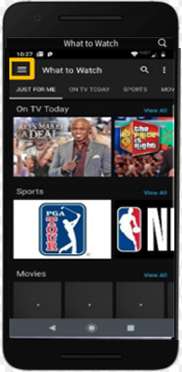
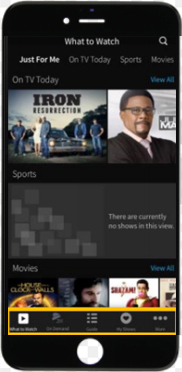
The What to Watch screen is the first screen that populates after logging in. You can navigate to different screen menu button on Android devices, or the Smart Bar at the bottom of the screen for iOS users.
 |
 |
| Android |
iOS |
-
Stream Live TV
-
To access live TV, click on the Guide icon at the bottom of the screen (or the Menu in Android)
- Scroll through the guide until you find what you want to watch
- Click on the program
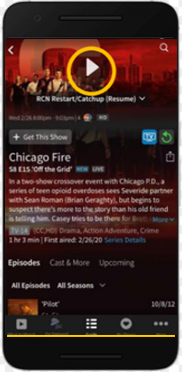
- Click the play arrow to start the live stream
- You may also have options to restart or record* the selected show!
*nDVR not available in some areas
-
Start Over/Catch Up
-
When Start Over/Catch Up is available, you'll see an icon  indicating that these offers are available indicating that these offers are available
-
Streaming Your Recordings*
-
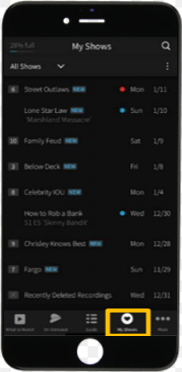
You can access all your recordings* at any time by pressing the My Shows icon at the bottom of the screen for iOS (or the Menu in Android)
- Click on the program
- Click the play arrow to start the stream
*nDVR not available in some areas
-
Watching On Demand
-
On Demand selections can be accessed using the On-Demand icon at the bottom of the screen (or the Menu in Android)
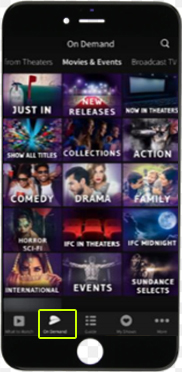
- Free content is available depending on your channel subscriptions
- VOD Purchases are not allowed through the App; only on your TV
- Adult VOD is not available
-
Can I stream content internationally?
-
- Content is not available internationally
- Streaming is limited to the continental US, Alaska, Hawaii and Puerto Rico
- International distribution rights are held by the content providers
-
In Home App (with Unmanaged Devices) Interface

- When this app is loaded it will work like the IPTV interface the customer is used to
- Choose Watch TV to view the last channel viewed or Guide to see what is on
-
Using the Guide with the In Home App (with Unmanaged Devices)

- Navigate through the guide using the arrow keys
- Hold the arrow key down for a quick scroll through the channels
- Setting recordings and one passes from the guide is exactly the same as IPTV
- Select the future show and follow the prompts
-
Trick Play with the In Home App (with Unmanaged Devices)

- The pause, fast forward and rewind buttons are the same and will show when you push the middle the arrow keys
-
Managing Devices Using Astound TV+
-
Go to my.astound.com/devices

- You can remove any device from the list using the Trash Can icon
|